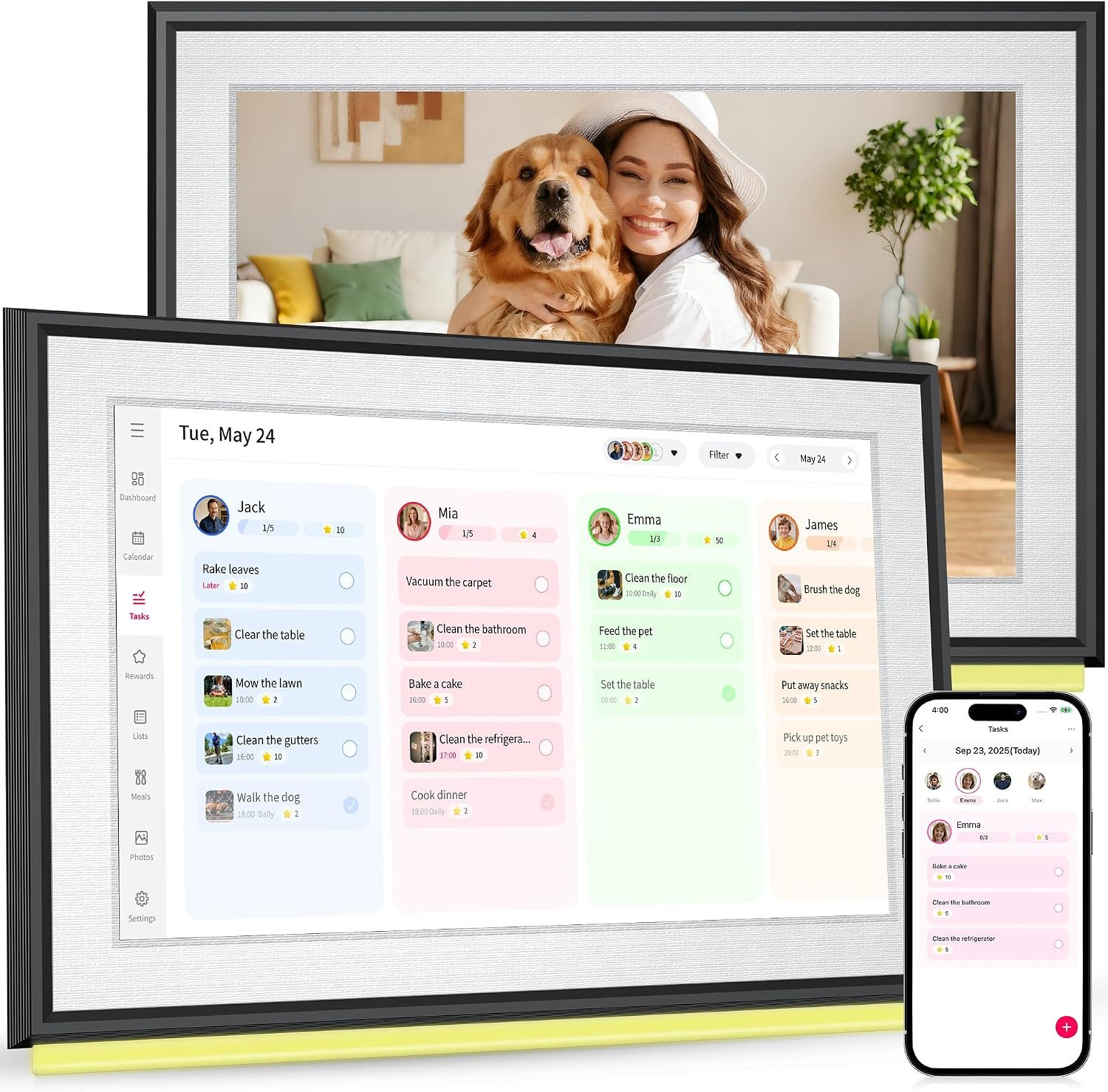
Keeping track of appointments, school activities, household responsibilities, meals, errands, and personal tasks can become surprisingly difficult when information is spread across several calendars, phone apps, paper notes, and messages. A digital family calendar can bring some of those planning activities into one visible location.
The BIGASUO 10.1″ Digital Calendar is designed around this idea. It combines a touchscreen display with calendar and household organization features, including monthly, weekly, and daily scheduling, chore management, meal planning, to-do lists, family schedules, weather information, alarms, and digital photo display capabilities. The device uses Wi-Fi connectivity and can work with the Whale Framely companion application for synchronization and management.
Rather than replacing every calendar or productivity application, a device like this is better understood as a dedicated visual planning screen for the home. Its purpose is to make important information easier to see and update without requiring everyone to open an individual smartphone.
This guide explains how the BIGASUO digital calendar works, what its different functions can be used for, who may find this type of device useful, and what factors are worth considering before adding a smart calendar to a household.
Introduction
Traditional wall calendars have one important advantage: everyone can see them. A digital calendar attempts to preserve that shared visibility while adding features that are difficult to achieve with paper.
The BIGASUO 10.1-inch model uses a touchscreen interface rather than printed calendar pages. According to the available product documentation, the device is identified as model 101C, has a 10.1-inch display, uses Wi-Fi connectivity, and is designed for desktop placement. The documentation also describes integration with the Whale Framely app and support for several calendar services, including Google Calendar, iCloud, Outlook, Cozi, and Yahoo Calendar.
That combination can make the device relevant to households where several people need access to the same information.
For example, a family might use one screen to show school events, work appointments, sports practices, household chores, meal plans, and grocery-related tasks. A couple might use it to coordinate work schedules and shared responsibilities. Someone living alone could use the display as a central daily planning station.
The picture-frame functionality adds another dimension. Instead of showing schedules continuously, the display can also be used for photos and slideshow-style content through the companion application.
The important distinction is that this is not simply a digital version of a paper calendar. It is a connected household display that combines several organizational functions.
Key Features
10.1-Inch Touchscreen Display
The central component is a 10.1-inch touchscreen. This provides enough display area for calendar information, tasks, lists, and other household content while keeping the device relatively compact.
A touchscreen can be particularly convenient for a shared calendar because users can interact directly with the display rather than relying entirely on a computer. The product documentation describes adding and managing events either on the device itself or through the companion application.
For a household, the physical screen also changes how information is encountered. A phone notification can easily be ignored or buried among other notifications, whereas a dedicated display in a common area can remain visible throughout the day.
Monthly, Weekly, and Daily Planning
Different scheduling situations require different levels of detail.
A monthly calendar is useful for seeing important dates at a glance. Birthdays, appointments, holidays, school events, trips, and other major commitments can be considered in the context of the entire month.
A weekly view is more practical for everyday family coordination. It can show which days contain extracurricular activities, appointments, work commitments, meal plans, and household responsibilities.
Daily planning goes further by focusing attention on individual tasks and events.
Having multiple time scales available can help users move between long-term planning and immediate responsibilities without maintaining separate paper systems.
Family Schedule Organization
One of the central uses of a shared digital calendar is coordinating several people’s schedules.
The available documentation indicates that tasks can be color-coded and assigned to individual family members. This can make a crowded schedule easier to interpret visually.
For example, different colors could represent parents, children, household activities, school events, or shared commitments. The exact organizational system can be adapted to the household rather than requiring everyone to follow the same structure.
This is particularly useful when the challenge is not simply remembering appointments, but understanding who needs to do what and when.
Chore Charts
Household chores can be handled separately from traditional calendar events.
Instead of placing every recurring responsibility into a calendar, a chore system can provide a dedicated way to track tasks. Examples might include cleaning a bedroom, taking out trash, feeding a pet, organizing school supplies, or completing other recurring household responsibilities.
The product documentation also references a rewards-related function in the updated software experience. Current product information indicates that the R-1.5.0 software version includes features such as Tasks, Rewards, Meals, and Photos.
Families should check the software version and current application functionality because connected-device features can change through updates.
Meal Planning
Meal planning can be useful for both organization and reducing last-minute decisions.
The BIGASUO calendar includes a meal-planning function that can be used to organize meals across the week.
A simple weekly structure could include breakfast, lunch, and dinner. The plan could also be used to remind household members what is scheduled for a particular evening.
For example:
- Monday: Pasta with vegetables
- Tuesday: Chicken and rice
- Wednesday: Soup and sandwiches
- Thursday: Fish with potatoes
- Friday: Homemade pizza
- Saturday: Leftovers
- Sunday: Family meal
The purpose is not necessarily to create a sophisticated nutritional planning system. Its value is in making the household’s food schedule visible and easier to coordinate.
To-Do Lists and Shopping Tasks
A dedicated digital to-do list can help keep small responsibilities from becoming forgotten notes.
The documentation describes uses such as grocery lists and errands, with information capable of being updated and shared among family members.
This can work well for tasks that do not belong on a calendar.
For example, “buy laundry detergent” is different from “doctor appointment at 2 PM.” A calendar is primarily time-oriented, while a task list can focus on completion.
Separating these two types of information can make a household planning system easier to understand.
Digital Picture Frame
The device can also function as a digital photo frame.
According to the available documentation, photos and videos can be shared from a phone using the Whale Framely application, allowing the display to show a continuous slideshow.
This means the device does not have to remain in calendar mode all the time.
For example, it could display family photographs during periods when no one needs to check the schedule. At another time, the same screen can return to household planning.
This dual-purpose approach can make a dedicated display more natural in a kitchen, home office, entryway, or common living area.
Weather Information
The documentation also lists a weather function that can display current conditions and forecasts.
For a family calendar, this can be useful because weather can influence daily plans. Outdoor activities, commuting, school events, gardening, errands, and weekend activities may all depend on conditions.
However, weather information should be treated as a convenience feature rather than a replacement for a dedicated weather service when detailed or critical forecasts are required.
Alarms and Reminders
The product documentation describes a switchable alarm function for reminders.
This can provide another way to draw attention to scheduled activities.
For example, a household could use reminders for:
- Leaving for an appointment
- Preparing for school
- Starting dinner
- Taking a break from a task
- Preparing for an upcoming event
- Completing a recurring household responsibility
Reminder functions can complement the calendar rather than replacing the user’s primary phone alarms or other time-sensitive notification systems.
How It Can Be Used
Creating a Family Command Center
One practical approach is to position the calendar in a shared area where household members naturally pass by.
A kitchen counter, home office, hallway table, or another stable surface can work depending on the layout of the home.
The objective is visibility. A digital calendar becomes more useful when people actually encounter it during their daily routines.
The available setup instructions describe placing the device on a stable, flat surface. They also indicate that the model is designed for desktop use and does not require a mounting bracket.
Organizing a Weekly Family Meeting
A household can use the display during a weekly planning session.
For example, on Sunday evening, family members could review:
- Appointments for the coming week
- School activities
- Work schedules
- Transportation requirements
- Chores
- Meals
- Shopping needs
- Special events
- Personal tasks
Once the information is organized, the screen can remain visible throughout the week.
This approach turns the digital calendar into a shared planning reference rather than simply a place where appointments are stored.
Managing Children’s Responsibilities
Families with children may use a visual task system to make responsibilities easier to understand.
A chore chart could divide tasks by person and day. Color coding can provide an additional visual distinction.
For younger children, a simple structure may be easier to follow than a long list of written instructions. Older children can potentially use the same system for school-related responsibilities, extracurricular activities, and household chores.
Parents should still decide which responsibilities are appropriate for each child’s age and abilities. The calendar itself is an organizational tool, not a substitute for parental supervision.
Coordinating Work and Home Schedules
Remote workers, shift workers, freelancers, and couples with different schedules may benefit from a shared display.
For example, one person might have meetings throughout the morning while another handles school pickup in the afternoon.
Putting both schedules into a shared system can make potential conflicts easier to identify.
The ability to connect external calendars is particularly relevant here. The product documentation lists Google Calendar, iCloud, Outlook, Cozi, and Yahoo Calendar among supported calendar integrations through the system.
Users should verify current compatibility during setup because third-party integrations can change over time.
Meal Planning and Grocery Preparation
Meal planning can be connected directly with shopping tasks.
For example, a family could create a weekly meal plan and then maintain a separate grocery list based on that plan.
The process might look like this:
Sunday: Decide meals for the week.
Sunday evening: Add required ingredients to the shopping list.
Monday through Friday: Refer to the meal plan when deciding what to prepare.
After shopping: Remove or mark completed grocery tasks.
This type of workflow can reduce the need to remember small details mentally.
Using It as a Photo Display
When the family schedule does not need to occupy the screen, photos can provide a more decorative function.
The companion app supports sharing photos and videos from a phone, according to the available documentation.
This can be useful in living spaces where users want the device to blend into the household environment rather than looking like a dedicated productivity screen at all times.
Who It May Be Suitable For
Busy Families
A household with multiple schedules may find a centralized display useful for making shared commitments visible.
The combination of calendars, chores, meals, and tasks means that several common planning categories can exist within the same system.
Couples Sharing Household Responsibilities
Couples can use a shared calendar to coordinate appointments, errands, meals, and household tasks.
Color coding or task assignment may make responsibilities easier to distinguish.
Remote Workers
People working from home may use the display to separate professional scheduling from personal planning while keeping both visible in one place.
It can also serve as a reminder system for breaks, appointments, errands, and household activities.
Students and Shared Households
Students or roommates can potentially use a shared display for cleaning schedules, shopping lists, shared events, and household responsibilities.
In these environments, clarity about who is responsible for a task can be just as important as the task itself.
People Who Prefer Visual Organization
Some people naturally respond better to information displayed physically in front of them than to notifications hidden inside applications.
A dedicated screen can provide an always-visible reference point.
That does not mean everyone will prefer a digital calendar. People who enjoy paper planners or prefer minimal technology may find a traditional calendar simpler.
Important Things to Consider
Wi-Fi Is Important
The BIGASUO digital calendar is a connected device. The setup documentation states that a stable Wi-Fi connection is required for full functionality and synchronization.
This means the experience can depend on the quality of the household network.
Before setup, consider whether the intended placement has reliable Wi-Fi coverage.
Companion App Setup
The device uses the Whale Framely application for synchronization and some management functions. The setup process involves downloading the application, creating or using an account, pairing the device, and connecting calendars.
This introduces an additional step compared with a paper calendar.
Anyone purchasing a connected organizer should be comfortable with installing an application and managing account permissions and connected services.
Calendar Integration Should Be Verified
The available manual lists several supported calendar services, but software integrations can evolve.
Before relying on the device for an important workflow, users should verify that the calendar platform they depend on is currently supported and that the desired synchronization functions are available in their region and software version.
This is particularly important for households that rely heavily on one specific calendar ecosystem.
Software Updates Can Change Functionality
Current product information references software version R-1.5.0 and identifies newer or enhanced functions involving Tasks, Rewards, Meals, and Photos.
This illustrates an important point about smart household devices: the capabilities may not remain completely static.
Users should periodically check the device’s update settings and consult the manufacturer’s documentation for current functionality.
Screen Size
A 10.1-inch screen is compact enough for a countertop or desk, but it is not comparable to a large wall-mounted display.
This matters when deciding how much information should appear simultaneously.
A small household may find the size appropriate for a central counter. A large family attempting to display many schedules simultaneously may need to organize the information carefully to avoid visual clutter.
Desktop Placement
The available manual describes the device as designed for desktop placement on a stable, flat surface.
Therefore, placement should be considered before purchase.
A suitable location should provide:
- Stable support
- Easy visibility
- Access to electrical power
- Reliable Wi-Fi
- Enough space around the device
- Protection from spills and excessive moisture
A kitchen can be convenient, but the display should not be positioned where it is likely to be splashed or exposed to steam.
Privacy and Shared Information
A family calendar can contain personal information such as appointments, names, schedules, activities, and household routines.
Users should consider who can physically see the screen and which external calendars are being synchronized.
Account permissions and connected services should be configured carefully. Sensitive information does not necessarily need to be displayed on a shared household screen simply because it exists in a connected calendar.
Power Requirements
Unlike a traditional calendar, a digital display needs electrical power.
That means the intended location should have access to an appropriate outlet and the cable should be positioned safely.
This is a small practical detail, but it can have a significant effect on where the device can be placed.
Comparing General Digital Calendar Categories
The BIGASUO device belongs to a broader category of digital planning and smart-display products. Different categories solve similar organizational problems in different ways.
Paper Calendars
Paper calendars are simple, inexpensive to maintain, and independent of Wi-Fi, software, accounts, or electrical power.
Their main limitation is that updates must be made manually and information cannot automatically synchronize across multiple digital services.
A paper calendar may therefore remain perfectly suitable for people who want a straightforward visual schedule without connected features.
Smartphone Calendar Apps
Smartphone applications provide portability and sophisticated notification systems.
A phone can accompany its owner almost everywhere, making it practical for personal scheduling.
The disadvantage is visibility. A phone calendar is generally designed around an individual rather than a shared household display.
A dedicated digital calendar approaches the problem from the opposite direction: it prioritizes shared visibility over portability.
Tablet-Based Planning
A standard tablet can be used for calendars, task applications, meal planning, photo display, and many other activities.
Its major advantage is flexibility. Users can install different applications according to their needs.
A dedicated calendar display, however, may provide a more focused experience because its primary purpose is household organization.
The choice between the two depends on whether flexibility or dedicated functionality is more important.
Smart Displays
General smart displays can combine calendars, weather, media, voice assistants, smart-home controls, and other functions.
They may be attractive to households already invested in a particular smart-home ecosystem.
A dedicated digital family calendar places more emphasis on scheduling, chores, meals, tasks, and family organization.
Dedicated Digital Family Calendars
This category sits between paper calendars and general-purpose smart displays.
The primary goal is to provide a shared household planning screen without requiring every person to repeatedly check a personal device.
The BIGASUO 10.1-inch model fits into this category through its combination of calendar views, tasks, chores, meal planning, family scheduling, and photo display functions.
Practical Organization Tips
A digital calendar can become less useful if too much information is placed on it.
One approach is to establish a simple information hierarchy.
Use the calendar for events with specific dates or times.
Use the task section for things that need to be completed but do not necessarily have a fixed appointment.
Use the meal planner for food-related planning.
Use the chore system for recurring household responsibilities.
Use the photo function when the display is not needed for planning.
Color coding can also be useful, but too many colors can create confusion. A small, consistent color system is usually easier to understand.
Another useful practice is to review the calendar regularly. A digital display can synchronize information, but it cannot automatically determine whether a family schedule still reflects everyone’s current plans.
Frequently Asked Questions
What is the BIGASUO 10.1-inch digital calendar?
It is a Wi-Fi-enabled touchscreen household organizer designed for calendar management, family schedules, chores, meal planning, to-do lists, reminders, weather information, and digital photo display. The documented model is 101C.
Does it connect to Wi-Fi?
Yes. The setup documentation describes Wi-Fi configuration as part of the initial setup process and states that a stable internet connection is needed for full functionality and synchronization.
Does it work with Google Calendar?
The available product manual lists Google Calendar among the calendar services that can be connected through the system. It also lists iCloud, Outlook, Cozi, and Yahoo Calendar.
Because software integrations can change, users should confirm current compatibility when setting up the device.
Can family members use it for chores?
Yes. Chore-chart functionality is one of the intended uses of the device. Tasks can be organized visually and assigned to family members according to the available documentation.
Can it be used for meal planning?
Yes. The device includes meal-planning functionality designed to help organize meals across the week.
Can it display photos?
Yes. The device can function as a digital photo frame, with photos and videos shared through the Whale Framely application according to the available documentation.
Does it have a weather function?
The product documentation lists weather information and forecasts as an additional feature.
Is the device portable?
It is designed primarily as a powered desktop display rather than a battery-powered portable organizer. The setup instructions describe connecting it to a power adapter and placing it on a stable, flat surface.
What size is the screen?
The documented screen size is 10.1 inches. The product specification information identifies the model as 101C and lists a white plastic construction.
Does it require a smartphone?
The device can be operated through its touchscreen, but the setup process uses the Whale Framely companion application for pairing, synchronization, and certain management functions.
Can it replace a smartphone calendar?
It does not necessarily need to replace one. A dedicated display and a smartphone calendar can serve different purposes. The phone is convenient for personal access and mobility, while the dedicated display can provide a shared household reference point.
Is it suitable for a large family?
That depends on how much information needs to be displayed at the same time. The 10.1-inch screen provides a relatively compact shared display, so larger households may benefit from keeping their schedules organized and limiting unnecessary information.
Does the device receive software updates?
Available product information references software version R-1.5.0 and provides instructions for checking for updates through the device settings.
Users should follow the manufacturer’s current instructions because software features and update procedures can change.
Conclusion
The BIGASUO 10.1″ Digital Calendar is designed around a simple organizational concept: place shared household information on a dedicated touchscreen that everyone can see.
Its functions extend beyond traditional calendar management. Monthly, weekly, and daily schedules can be combined with family tasks, chore organization, meal planning, to-do lists, weather information, reminders, and digital photographs. The device also supports synchronization through the Whale Framely application and lists compatibility with several established calendar services.
The most important consideration is not simply the number of functions available. It is whether a shared visual planning system fits the way a household already organizes information.
For families that frequently coordinate appointments, chores, meals, errands, school activities, and work schedules, having a dedicated screen in a common area can provide a different experience from relying exclusively on individual smartphones. At the same time, people who prefer paper calendars, minimal technology, or completely portable planning may have different requirements.
As with any connected household device, it is also worth considering Wi-Fi availability, companion-app setup, calendar compatibility, software updates, privacy, placement, and power requirements before making a decision.
When used with a consistent household planning routine, a digital calendar can serve as more than a calendar. It can become a central visual reference for the activities that keep everyday life moving.
You can check more details on Amazon here.
Amazon Associates Disclosure: As an Amazon Associate, we earn from qualifying purchases.
Leave a Reply