Communication becomes especially important when an older adult, person recovering at home, or individual who needs regular assistance cannot always reach a caregiver directly. In a typical household, simply calling someone’s name or walking from one room to another may not always be practical. A dedicated wireless call-button system can provide another way to request attention without requiring a phone or complicated technology.
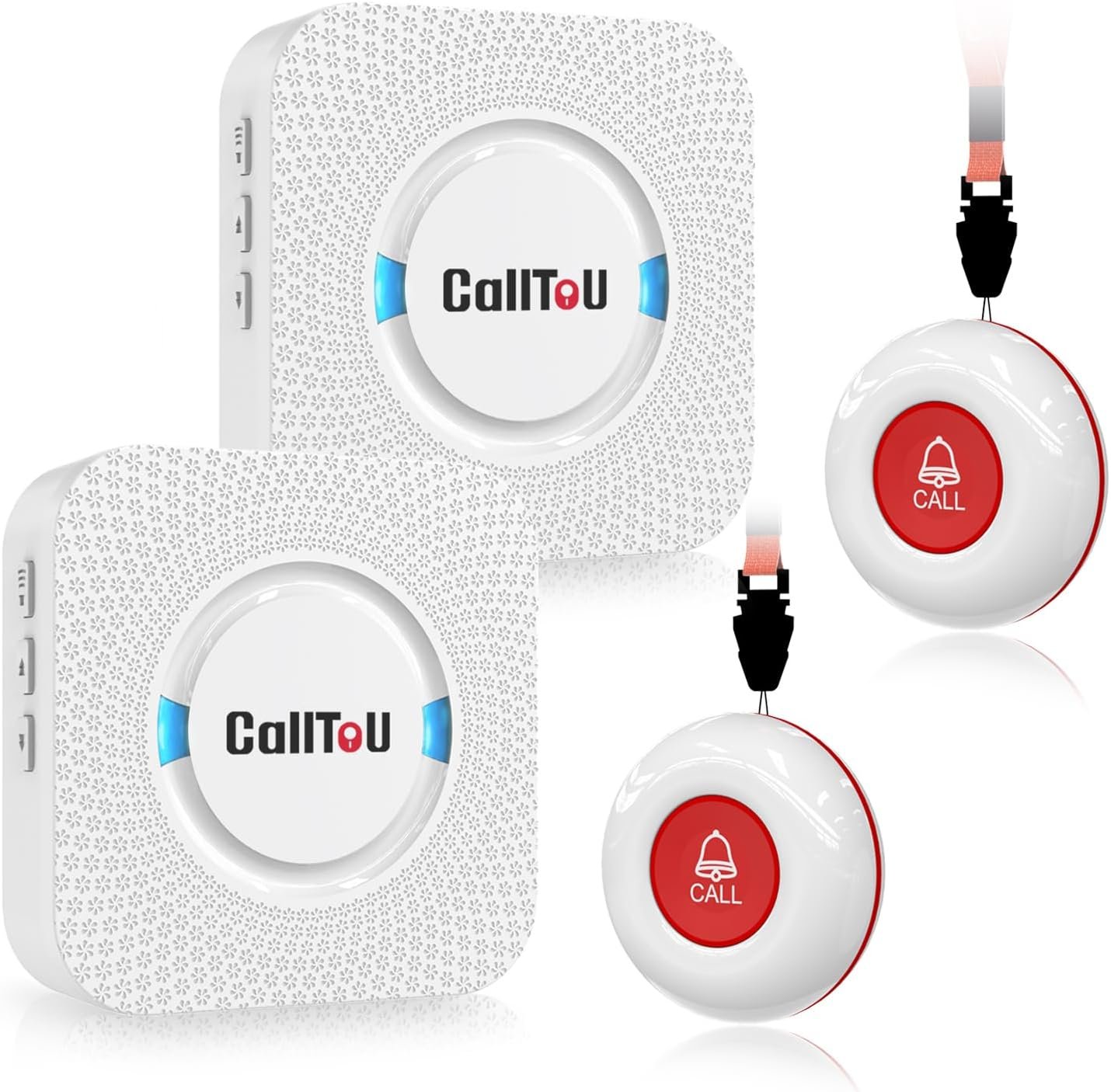
The CallToU Caregiver Pager with two wireless call buttons is designed for this type of situation. The system associated with model CC01 2-2 includes two wireless call buttons and two plug-in receivers. CallToU describes the system as a home caregiver alert solution, with the buttons designed to be carried or mounted and the receivers intended to notify a caregiver when a button is pressed.
The product is built around a relatively straightforward concept: place or wear a call button where assistance may be needed, and position the receiver or receivers where the caregiver can hear the alert. The system does not require the person requesting help to operate a smartphone, open an application, or navigate a touchscreen.
According to the manufacturer’s information, the system offers a wireless operating range of more than 500 feet in an open area, five adjustable volume levels, and 55 selectable ringtones. The call buttons use replaceable 23A 12V batteries, while the receivers plug into electrical outlets.
Those specifications can be useful, but a caregiver alert system should always be viewed as a communication aid rather than a substitute for supervision, emergency services, or a professionally monitored medical alert system.
This guide explains how the CallToU system works, practical ways it can be used around a home, important considerations when setting it up, and how it compares with broader categories of caregiver communication products.
Introduction
Providing care at home often involves a balance between helping someone when assistance is needed and allowing that person to maintain as much independence and privacy as practical.
For example, an older adult may be comfortable spending time in a bedroom while a caregiver prepares food in the kitchen. Someone recovering from an injury may need occasional help getting up, while otherwise being able to remain independently in another room. A person with limited mobility may simply need a reliable way to signal that assistance is required.
In these situations, communication does not necessarily need to be complicated.
A wireless call button can serve as a simple bridge between the person requesting assistance and the caregiver. Instead of shouting across the house, walking to find someone, or using a smartphone, the person can press a physical button.
The CallToU CC01 2-2 system uses two call buttons and two receivers. The manufacturer describes the call buttons as portable and suitable for wearing around the neck or positioning near a bed, while receivers can be placed in areas where a caregiver is likely to hear them.
The two-button configuration can also provide flexibility. One button might remain beside a bed while another is placed in a bathroom or carried by the person.
The two receivers can likewise be positioned in different parts of the home, potentially making it easier for a caregiver to receive an alert without carrying a receiver everywhere.
The system’s simplicity is one of its defining characteristics. It focuses on local wireless communication rather than relying on a smartphone application or an internet connection.
Key Features
Two Wireless Call Buttons
The package configuration includes two wireless call buttons and two receivers. The buttons act as transmitters: when one is pressed, the corresponding signal is sent to the receiver or receivers.
Having two buttons can be useful when assistance may be needed in more than one location.
For example, one button could be kept beside a bed while the second is placed in another frequently used area. Alternatively, two people could potentially have their own call button, depending on the household’s needs and setup.
The manufacturer also describes the call buttons as portable. They can be carried in a pocket, worn using a neck strap, or secured to a suitable location with mounting accessories.
This flexibility allows the system to be configured around the person rather than requiring the person to remain in one particular room.
Two Wireless Receivers
The two receiver units provide another layer of flexibility.
CallToU describes the receivers as plug-in units. Once positioned in suitable outlets, they can provide an audible alert when a call button is activated.
Having two receivers can be useful in a home where the caregiver moves between different rooms.
For instance, one receiver might be located near the kitchen while another is placed near a home office. The goal is to reduce the possibility that a caregiver is too far away to hear a single receiver.
The exact placement should depend on the home’s layout and the caregiver’s normal routine.
500+ Foot Open-Area Range
CallToU lists an operating range of more than 500 feet in an open area for this system.
It is important to understand what “open area” means in practical terms.
Wireless range inside a building can be considerably different from an unobstructed outdoor measurement. Walls, floors, building materials, appliances, electronic interference, and the physical arrangement of a house can all influence signal performance.
A large home should therefore be tested after installation rather than assuming that an advertised open-area range will translate directly into the same distance indoors.
A simple test is to place the call button in the locations where it will actually be used and confirm that each receiver responds reliably.
Five Adjustable Volume Levels
The receiver provides five volume settings. CallToU lists an adjustable range from 0 dB to 110 dB for the CC01 system.
Different environments can require different alert levels.
A quiet bedroom may not need the same volume as a busy kitchen or a room with television or other background noise.
A caregiver can select a level that is audible without unnecessarily creating excessive noise throughout the home.
The user should also consider the hearing abilities of the caregiver. If the person responsible for responding has hearing difficulties, an audible-only alert may not provide enough redundancy.
55 Selectable Ringtones
The receiver offers 55 ringtone options according to the manufacturer’s product information.
The purpose of having multiple sounds is primarily customization.
A household can choose a tone that is easily recognizable and distinguishable from ordinary household sounds.
This can be particularly useful when a caregiver receives other alerts during the day. A dedicated sound can help identify that the signal came from the caregiver call system.
The system can be configured by selecting a ringtone on the receiver and pairing the call button with it according to the manufacturer’s instructions.
Portable Call Buttons
The call buttons are designed to provide several placement options.
CallToU describes options including carrying the button in a pocket, wearing it around the neck with the supplied lanyard, or securing it near a bed or other location with mounting accessories.
This matters because the most useful location for a call button is usually the location where assistance may actually be needed.
A button that is mounted across the room may be less practical than one that remains within easy reach.
For someone with limited mobility, the button should be positioned according to their physical abilities rather than simply according to what looks convenient from a room-layout perspective.
Water-Resistant Call Button Design
CallToU describes the call button as water-resistant and suitable for environments where it may encounter splashes. The company’s product information indicates that the button can be installed in a bathroom and is designed to tolerate splashing, while also warning against prolonged immersion.
This can be particularly relevant because bathrooms are one of the places where an individual may need assistance and where a conventional electronic device could be inconvenient.
Water resistance should not be interpreted as permission to submerge the button or expose it to water beyond the manufacturer’s specified conditions.
The receiver and charging or electrical components should also be treated according to their own instructions.
Battery-Powered Call Buttons
The call buttons use replaceable batteries. The manufacturer’s documentation identifies a 23A 12V battery for the call button and provides instructions for opening the back cover and replacing it.
Battery-powered buttons make placement more flexible because the person is not tied to a wall outlet.
However, battery maintenance becomes part of the caregiver’s routine.
For a device intended to communicate an important request for assistance, it is sensible to check battery condition periodically rather than waiting for the button to stop working.
Plug-In Receivers
The receiver units are designed to plug into electrical outlets.
This removes the need to maintain batteries in the receiver, but it means the receiver’s location is constrained by available outlets.
When deciding where to place a receiver, caregivers should consider both hearing range and electrical safety.
A receiver should be positioned where its alert can be heard while also avoiding situations where the power cord or device could become a tripping hazard.
How It Can Be Used
Beside the Bed
A bedside call button is one of the most straightforward applications.
An individual may need assistance with standing, retrieving an item, adjusting something in the room, or requesting help with another task.
The button can be mounted near the bed or positioned within easy reach.
The key consideration is accessibility. A button should not be placed somewhere that requires the person to stand up or stretch dangerously to reach it.
In the Bathroom
Bathrooms can present additional challenges because of water, slippery surfaces, and limited mobility.
A call button positioned within reach can provide a simple way for someone to request assistance.
The manufacturer specifically describes its call button as suitable for bathroom installation and capable of handling splashes.
However, the button should still be installed in a location where it can be reached safely. It should not be positioned where a person would have to move into an unsafe position to press it.
The device also should not be treated as an emergency response system capable of automatically contacting emergency services.
In the Kitchen
A call button can also be used in or near a kitchen.
An older adult may spend time preparing food or sitting at a kitchen table while a caregiver works elsewhere.
If the person needs assistance, pressing the button can provide a direct way to signal the caregiver.
Because kitchens contain appliances, water, heat, and other hazards, placement should be selected carefully.
Living Room
A living room can be another suitable location for a permanently mounted button.
If the person spends significant time in a chair or on a sofa, the call button can be positioned close enough to reach without unnecessary movement.
The receiver can then be placed in the caregiver’s usual working area.
Yard or Nearby Outdoor Areas
The manufacturer describes an open-area range of more than 500 feet.
Depending on the home’s layout and signal conditions, the system may also be useful when a caregiver and the person needing assistance are in different parts of a property.
However, outdoor use should be tested rather than assumed. Buildings, walls, terrain, and other obstructions can affect wireless communication.
Multiple Caregiver Locations
The two-receiver configuration can be helpful when a caregiver spends time in more than one part of the home.
For example, one receiver could remain in a kitchen and another in an upstairs area.
The purpose is not to guarantee that an alert will be heard everywhere. Instead, it provides additional receiver locations that can be selected according to the household’s layout.
Temporary Recovery at Home
A wireless call button can also be useful during a temporary period when someone needs additional assistance.
Examples may include recovery after an illness or procedure, temporary mobility limitations, or a period when a family member is helping someone who normally lives independently.
Because the system is wireless and the buttons can be mounted or carried, the arrangement can be changed as needs change.
Who It May Be Suitable For
Older Adults Living at Home
The system is designed around at-home caregiver communication and can be considered for older adults who need a convenient way to request attention.
It may be particularly useful when the caregiver and older adult spend time in different rooms.
The person using the button should still be capable of recognizing when they need assistance and physically pressing the button.
Family Caregivers
Family members who provide care at home may use a wireless pager as a simple communication method.
The receiver can remain nearby while the caregiver completes household tasks.
This can help reduce the need for constant verbal communication across rooms.
People With Temporary Mobility Limitations
Someone who temporarily has difficulty walking may benefit from having a call button within reach.
This can be particularly relevant around a bed, chair, or other location where standing without assistance may be difficult.
The suitability of any communication device depends on the individual’s abilities.
People Who Prefer Simple Controls
A physical call button is much simpler than a smartphone-based alert application.
There is no need to unlock a phone, locate an app, or navigate a digital interface.
For someone who is comfortable with a physical button but not with smartphone technology, this type of system may be easier to understand.
Important Things to Consider
It Is Not a Monitored Medical Alert System
This is one of the most important distinctions.
The CallToU caregiver pager is a local wireless communication system. Pressing the button alerts the paired receiver.
It does not, by itself, mean that emergency services, a monitoring center, a doctor, or another remote professional will automatically be contacted.
For someone at significant risk of a medical emergency, caregivers should consider whether a professionally monitored medical alert system or another emergency-response solution is more appropriate.
The CallToU device can be viewed as an additional household communication tool rather than a replacement for emergency services.
Wireless Range Depends on the Environment
The manufacturer specifies more than 500 feet in an open area.
Indoor range can be different.
Concrete walls, multiple floors, metal structures, appliances, and other sources of interference may reduce effective range.
Testing the system in the actual home is therefore important.
The test should cover the locations where the button may realistically be used, including bedrooms, bathrooms, kitchens, living areas, and outdoor spaces if applicable.
Battery Maintenance Matters
A call button is only useful if its battery has sufficient power.
Because the buttons use replaceable batteries, caregivers should establish a routine for checking and replacing them.
It may also be sensible to keep compatible replacement batteries available.
The manufacturer provides instructions for replacing the 23A 12V battery by opening the button housing and securing it again afterward.
After changing a battery, the button should be tested to confirm that the receiver responds.
Receiver Placement
A receiver should be placed where the caregiver is likely to be.
Installing both receivers in rooms that are rarely occupied may provide little practical benefit.
Consider the caregiver’s daily routine. If the caregiver spends mornings in a home office and afternoons in the kitchen, the receiver locations can reflect that pattern.
Volume Selection
The five volume settings allow customization, but louder is not always better.
An excessively loud alert may become unpleasant, especially if it is triggered frequently.
The appropriate setting should be audible to the intended caregiver from normal working locations without unnecessarily disturbing the household.
Button Accessibility
A call button should be within comfortable reach.
For someone lying in bed, placing the button on a nearby table may be less useful if they cannot reach the table.
Likewise, a wall-mounted button should be positioned at an appropriate height.
The system should be evaluated based on the actual person using it rather than simply following a generic placement.
Water Resistance Has Limits
CallToU’s product information describes the button as water-resistant and suitable for splashes, including bathroom use.
That does not mean the button should be submerged.
It is also important to distinguish the call button from the receiver. Water-resistant characteristics of one component should not automatically be assumed for every part of the system.
False Presses and Accidental Alerts
A call button placed too close to bedding, clothing, or other objects may potentially be pressed unintentionally.
Caregivers should observe how the button is used and select a mounting location that balances accessibility with accidental activation.
Privacy and Dignity
A caregiver communication system can support independence when it allows a person to request help without shouting or repeatedly calling for someone.
However, the technology should be introduced as a convenience rather than as a way to monitor every movement.
The person using the button should understand what it does and, where appropriate, participate in deciding where it will be placed.
Comparison of General Categories
Wireless Caregiver Pagers
Wireless caregiver pagers are designed primarily for communication within a home or other local environment.
They usually consist of a transmitter or call button and one or more receivers.
The CallToU system fits this category. Its focus is simplicity: press a physical button and alert a receiver.
This can make the category useful for household communication where internet connectivity is unnecessary.
Smartphone-Based Alert Systems
Smartphone systems can provide notifications over the internet and may allow communication over longer distances.
Their main advantage is remote access.
However, they introduce additional dependencies such as smartphones, applications, accounts, internet connectivity, and battery charging.
For someone who needs a simple physical button, those requirements may add unnecessary complexity.
Smart-Home Alert Devices
Smart-home ecosystems can sometimes be configured to send notifications when buttons or sensors are activated.
These systems can integrate with other household automation features.
The trade-off is greater configuration complexity. Users may need compatible hubs, applications, internet services, or additional devices.
A dedicated caregiver pager generally focuses on one task rather than becoming part of a broader smart-home network.
Professional Medical Alert Systems
Professional medical alert services may include monitoring centers, emergency response, GPS functionality, fall detection, or other specialized features depending on the provider.
These systems serve a different purpose from a basic local caregiver pager.
Someone who spends substantial periods alone or faces a significant risk of an emergency may need to evaluate a professionally monitored solution rather than relying solely on a local wireless pager.
Traditional Bells and Intercoms
A traditional bell or intercom can also provide household communication.
An intercom may allow two-way communication, while a simple bell may only provide a signal.
The CallToU system focuses on a dedicated alert button and receiver arrangement, which can be useful when the main requirement is simply notifying a caregiver that assistance is needed.
Practical Setup Suggestions
A good setup begins with identifying where assistance is most likely to be requested.
Start by considering the person’s normal daily routine.
Where do they sleep?
Where do they spend most of the day?
Do they use a bathroom independently?
Do they sit in a particular chair?
Do they spend time outside?
Once those locations are identified, decide where the call buttons should be placed.
One button might remain beside the bed, while the second can be carried or positioned in another area.
Then place the receivers according to the caregiver’s routine.
After pairing the system, test every button from every important location.
Do not perform the test only once.
Repeat it from different rooms, different floors, and outdoor areas if those areas are part of the intended use.
Testing can reveal signal limitations that are not obvious from the manufacturer’s open-area range specification.
It is also useful to establish a simple household procedure:
Press the button → caregiver receives the alert → caregiver responds → situation is checked → system is ready again.
Everyone involved should understand what the alert means.
If multiple people use the system, household members should also know which button belongs to which person or location if the setup has been customized that way.
Maintenance and Everyday Care
Wireless caregiver equipment is relatively simple, but routine checks are worthwhile.
The call buttons should be inspected periodically for damage.
Battery condition should be monitored and batteries replaced when necessary.
Receivers should remain connected to their power sources and positioned securely.
The buttons and receivers should be cleaned according to the manufacturer’s instructions.
CallToU’s documentation recommends cleaning the relevant components with appropriate care and avoiding harsh chemicals or abrasive cleaning methods.
If a button has been used in a bathroom or another area exposed to moisture, it should be checked to ensure it remains in good condition.
Most importantly, the entire system should be tested periodically.
A device that worked correctly several months ago should not simply be assumed to remain functional indefinitely.
Frequently Asked Questions
What is the CallToU caregiver pager?
It is a wireless home alert system designed to allow a person to press a call button and send an alert to one or more caregiver receivers. The referenced configuration contains two call buttons and two receivers.
How many call buttons are included?
The referenced CC01 2-2 configuration includes two wireless call buttons.
How many receivers are included?
The same configuration includes two plug-in receivers.
What is the wireless range?
CallToU specifies an operating range of more than 500 feet in an open area. Actual indoor performance can vary depending on walls, floors, building materials, and interference.
Does the call button require batteries?
Yes. The manufacturer’s documentation identifies a replaceable 23A 12V battery for the call button.
How does the caregiver receive an alert?
When the call button is pressed, the paired receiver produces the selected alert sound and uses its indicator light to signal that a call has been received.
Can the call button be worn around the neck?
Yes. CallToU describes a neck lanyard option that allows the button to be worn as a pendant.
Can the button be mounted near a bed?
Yes. The manufacturer describes mounting options using a bracket or adhesive and specifically identifies bedside placement as one possible use.
Can the call button be used in a bathroom?
CallToU describes the button as water-resistant and suitable for splash exposure, including bathroom placement. It should not be treated as a device intended for prolonged immersion.
How many ringtone choices are available?
The receiver provides 55 selectable ringtones according to CallToU’s product information.
How loud can the receiver be?
CallToU lists five adjustable volume levels ranging from 0 dB to 110 dB for this system.
Does it require Wi-Fi?
The standard CC01 2-2 caregiver pager operates as a local wireless system and does not require a smartphone application or home Wi-Fi connection for its basic call-and-receiver function. The manufacturer describes the system as a plug-and-play wireless caregiver pager.
Can it automatically call emergency services?
No. This type of local caregiver pager is designed to alert its paired receiver. It should not be confused with a professionally monitored medical alert service that can contact an emergency response center.
Can it replace a medical alert system?
Not necessarily. The appropriate system depends on the individual’s needs and level of risk. A local caregiver pager is primarily intended for communication with someone nearby in the same home or property.
Can two receivers be useful in a large house?
They can provide additional listening locations, which may be useful when a caregiver moves between rooms. However, the actual wireless range should be tested in the specific home because indoor conditions can affect signal performance.
Is the system suitable for someone who lives completely alone?
A local caregiver pager may have limited usefulness for someone who has no caregiver within the receiver’s range. A person living alone may need a different type of emergency communication system, particularly if there is a significant risk of falling or another medical emergency.
Does the person need a smartphone to use the call button?
No. The basic call function is based on pressing the physical wireless button and activating the paired receiver.
Is it useful for temporary home care?
It can be considered for temporary situations where someone needs a convenient way to request assistance from a nearby caregiver, provided the system’s limitations are understood.
Conclusion
The CallToU Caregiver Pager with two wireless call buttons is built around a straightforward approach to at-home communication: provide the person needing assistance with an accessible physical button and give the caregiver one or more receivers that can signal when help is requested.
The referenced CC01 2-2 configuration includes two call buttons and two receivers, with the manufacturer specifying more than 500 feet of open-area wireless range, five adjustable volume levels, 55 ringtone choices, portable call buttons, and water-resistant button construction.
The system can be configured for several everyday situations. A button can be positioned beside a bed, carried around the home, worn as a pendant, or placed in another area where assistance may be needed. Two receivers provide flexibility for caregivers who move between different parts of the house.
Its simplicity is also worth considering. There is no requirement for the person requesting help to operate a smartphone or navigate an application. At the same time, the system remains a local communication tool rather than a professionally monitored emergency response service.
For households considering a caregiver pager, practical setup is just as important as the specifications. The buttons should remain within comfortable reach, receivers should be placed where the caregiver can hear them, batteries should be checked regularly, and the wireless signal should be tested throughout the areas where the system will be used.
Most importantly, caregivers should match the communication system to the individual’s actual needs. Someone who simply needs an easy way to get a family member’s attention may have very different requirements from someone who is at significant risk of a medical emergency or spends long periods alone.
Used within those boundaries, a wireless caregiver pager can provide a simple communication channel between rooms while supporting a person’s ability to request assistance without constantly calling or shouting for someone.
You can check more details on Amazon here.
Amazon Associates Disclosure: As an Amazon Associate, we earn from qualifying purchases.
Leave a Reply