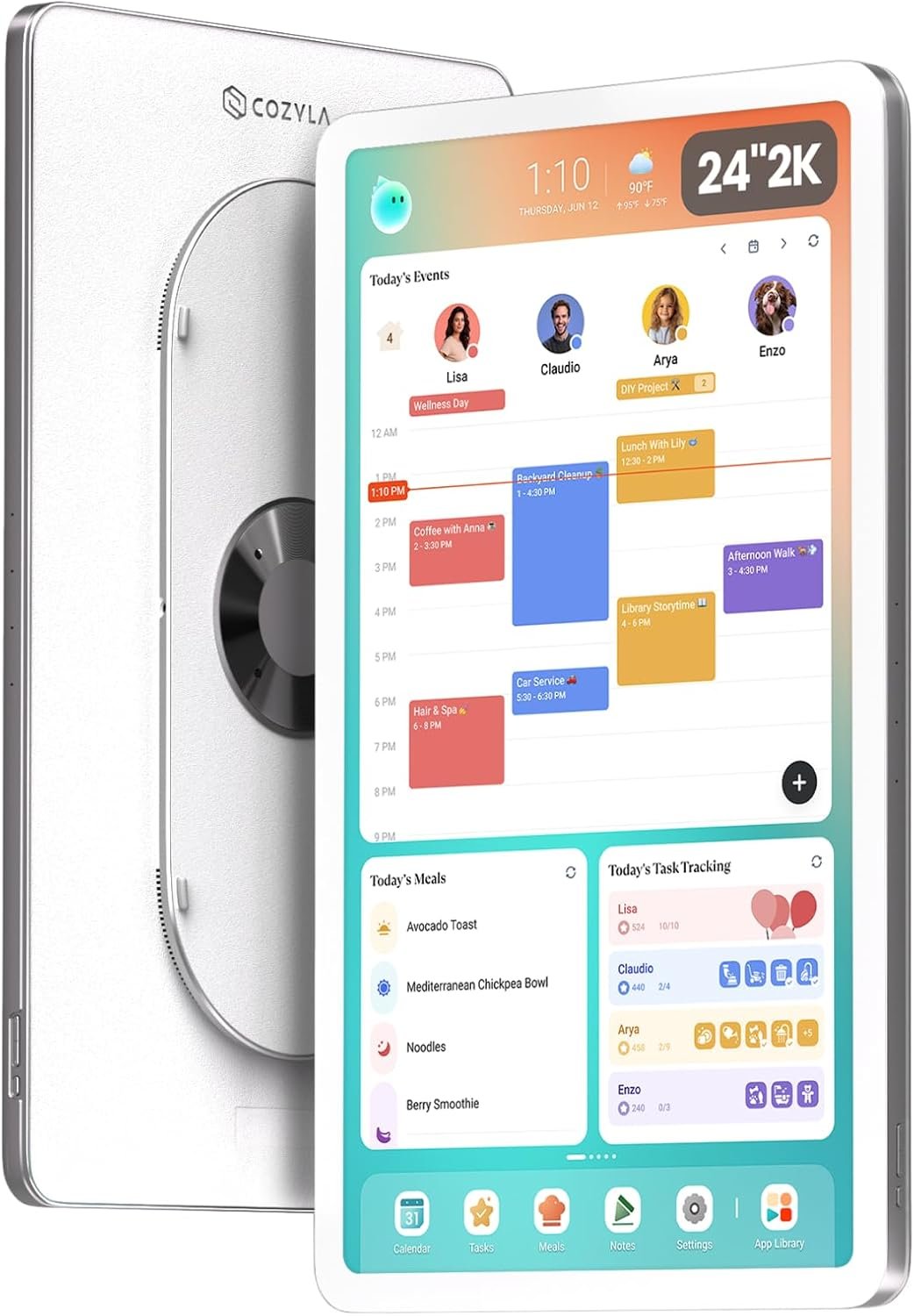
Keeping a family organized can become complicated when schedules, appointments, school activities, household responsibilities, meals, shopping lists, and personal tasks are spread across different apps and devices. One person may use Google Calendar, another may rely on an iPhone calendar, while children may have their own routines and responsibilities. A shared physical calendar can help, but traditional paper calendars are limited when plans change frequently.
The Cozyla Calendar Plus 3 24-inch 2K Smart Digital Calendar approaches this problem as a large shared touchscreen designed to act as a household information center. It combines a digital calendar with customizable widgets, task management, meal planning, applications available through Google Play, and other functions that can be arranged according to a family’s needs. Cozyla describes Calendar Plus 3 as a smart family command center, while its current product information identifies the 24-inch model as a QHD display.
One of the most significant differences between a dedicated family calendar and a conventional smartphone calendar is visibility. A phone is usually associated with one person. A large wall-mounted display can instead provide a shared reference point that household members can see throughout the day.
Calendar Plus 3 also takes a more flexible approach than a traditional dedicated calendar. Its Google Play Store access allows users to install compatible third-party applications, while the customizable dashboard can be arranged with widgets for calendars, tasks, weather, media, and other household information.
This guide explains what the Calendar Plus 3 is designed to do, how its different features can fit into everyday household organization, what should be considered before installation, and how a large smart calendar compares with other approaches to family planning.
Introduction
A family calendar has one fundamental purpose: make upcoming activities easier to understand.
The challenge is that modern household schedules are rarely limited to appointments. A typical week may involve work meetings, school events, sports practices, medical appointments, birthdays, errands, chores, meal preparation, grocery shopping, travel, and personal tasks.
A calendar that only displays appointments may therefore leave out a large part of the information a family needs to coordinate everyday life.
The Calendar Plus 3 expands the traditional calendar concept by combining scheduling with a customizable touchscreen dashboard. The current Cozyla product page describes support for shared calendars, customizable widgets, third-party applications through Google Play, and a range of household-oriented functions.
The 24-inch 2K version is particularly focused on visibility. A larger screen can display more information at once than a smartphone or compact tablet, making it potentially suitable for a common area such as a kitchen, hallway, dining area, or family room.
The device is also designed to connect with the Cozyla+ ecosystem. Current Cozyla documentation explains that Calendar Plus 3 setup involves connecting the device to Wi-Fi, installing or using the Cozyla+ app on a phone, activating the device, and completing available software updates.
This connected approach means the calendar can be more than a static display. Changes made through supported services can be reflected across the household’s shared planning environment.
At the same time, a smart calendar introduces considerations that do not exist with paper. Internet connectivity, software updates, account management, application compatibility, privacy, wall placement, and potential subscription-dependent features should all be considered before establishing it as the household’s primary planning system.
Key Features
24-Inch 2K QHD Display
The defining physical feature of this version is its 24-inch display with 2K QHD resolution. Current Cozyla product information identifies the 24-inch Calendar Plus 3 as a QHD model, while third-party product information for the referenced Amazon listing identifies the configuration as a 24-inch 2K digital calendar.
A large display changes the way a calendar can be used.
Instead of opening a phone application and navigating between screens, household members can view a larger amount of information from a fixed location.
This can be useful when several calendars are displayed together. Family members can potentially use separate colors or categories to distinguish schedules.
The screen size also provides more room for additional dashboard elements such as tasks, weather, meals, or other widgets.
Customizable Dashboard
Calendar Plus 3 is not limited to one fixed calendar layout.
Cozyla describes a customizable dashboard where users can drag, drop, and resize widgets to create a household-specific home screen.
This makes it possible to prioritize information according to the household’s routine.
For example, a family that spends most of its time coordinating appointments might place the shared calendar prominently on the main page.
Another household might prefer a layout containing:
- Weekly calendar
- Chore list
- Meal plan
- Weather
- Grocery list
- To-do items
- Music or another media application
The ability to change the layout also means the device does not need to remain configured the same way forever.
As family routines change, the dashboard can be reorganized.
Google Play Store Access
One of the major distinctions between Calendar Plus 3 and a conventional dedicated digital calendar is access to the Google Play Store.
Cozyla describes the Calendar Plus platform as running on Android and providing access to applications through the pre-installed Google Play app store.
The practical significance is flexibility.
A dedicated calendar with a closed software environment can generally perform only the functions supplied by its manufacturer. A device with Google Play access can potentially be customized with compatible applications for productivity, entertainment, communication, education, weather, media, and other purposes.
However, access to an app store does not mean every application will provide an ideal experience on a 24-inch wall display.
Applications are developed for different screen sizes, orientations, input methods, and operating environments. Compatibility should therefore be checked before relying on a particular third-party application.
Shared Calendar Synchronization
Cozyla’s current software ecosystem supports shared calendar synchronization across multiple services. The Cozyla+ app describes integration with iCloud, Google, Outlook, and other calendars.
This can be particularly useful for families where different members already use different calendar platforms.
Instead of asking everyone to abandon their existing calendar service, a shared household display can act as a central visual layer.
For example:
- One parent may use Google Calendar.
- Another may use an Apple calendar.
- A child may have a school-related schedule.
- The household may maintain shared events separately.
The precise synchronization behavior depends on the supported service and current software configuration, so users should verify compatibility before depending on a particular integration.
Color-Coded Family Scheduling
Color coding can make a shared calendar easier to interpret.
Cozyla’s current app information describes assigning a unique color to each family member so users can identify schedules visually.
For a busy household, this can reduce the amount of time spent reading individual event details simply to determine who is involved.
For example, a family could establish a simple system:
Blue: Parent 1
Green: Parent 2
Purple: Child 1
Orange: Child 2
Gray: Shared household events
The exact colors do not matter as much as consistency.
Too many categories can eventually become difficult to interpret, so a simple color system may be easier to maintain.
Chore and Task Management
Calendar Plus devices are designed to combine calendar management with household tasks.
The current Cozyla+ application provides task functionality including chores, recurring routines, to-do lists, and rewards.
This is important because not every responsibility belongs on a calendar.
“Doctor appointment at 3 PM” is an event.
“Clean the garage” is a task.
“Take out the trash every Tuesday” is a recurring responsibility.
A system that separates these concepts can make household planning more structured.
The current Cozyla software also describes a reward system in which children can earn stars for completing chores.
Families can decide whether such a system fits their parenting approach. The feature is an organizational option rather than something every household needs to use.
Meal Planning
Meal planning is another component of the Cozyla ecosystem.
The current Cozyla+ application includes weekly meal planning, recipes, grocery lists, and pantry tracking. It also states that users can explore more than 5,000 recipes and import recipes from a photograph or URL through Smart Import.
For a household, this can connect several planning steps that are normally handled separately.
A family can decide what meals are planned, organize the required groceries, and then refer to the meal schedule during the week.
This can be especially useful in homes where multiple people contribute to food preparation or shopping.
Weather Information
Weather can be incorporated into the dashboard alongside the calendar.
This may be useful when outdoor activities, school events, commuting, gardening, sports, or weekend plans are part of the household schedule.
The customizable dashboard is designed to support widgets such as weather alongside calendar and other information.
Weather information should still be treated as a convenience rather than a substitute for specialized weather information when conditions are important to safety.
Google Play Applications
The Google Play Store expands the device beyond calendar-specific functions.
Potential categories include:
- Streaming services
- Music
- Productivity applications
- Educational tools
- Web browsers
- Weather applications
- Household utilities
- Communication tools
- Entertainment
The usefulness of any specific application depends on compatibility with the device and its software environment.
Users should also consider whether installing too many applications would make the dashboard more complicated rather than more useful.
Voice and AI Features
Current Cozyla information also describes a Cozyla Agent designed to assist with planning and organization. The Cozyla+ app describes it as a built-in family helper that can assist with planning and everyday organizational tasks.
The referenced Calendar Plus 3 product information also highlights a hands-free voice agent.
These features can potentially make certain interactions faster, particularly when adding information without manually navigating through multiple screens.
However, users should distinguish between convenience-oriented AI assistance and authoritative information. Any generated suggestion should still be reviewed before being treated as a final household plan.
How It Can Be Used
Creating a Central Family Calendar
The most straightforward use is as a shared household calendar.
A family can place the device somewhere visible and use it as the central reference point for the week’s activities.
The main advantage of this arrangement is visibility.
A phone calendar is often checked only when someone thinks to open it. A wall display can remain visible throughout the day.
This can be especially useful for families where several people need to know what is happening without constantly messaging one another.
Planning the Week
A weekly planning session can become easier when the entire schedule is visible on one large screen.
For example, a family could review the calendar every Sunday and identify:
- Appointments
- School activities
- Work commitments
- Sports and extracurricular activities
- Transportation requirements
- Household chores
- Meals
- Grocery requirements
- Special events
Once the week is organized, the display can remain available as a shared reference.
Managing Children’s Chores
A household can use the task system to assign responsibilities to children.
Tasks could include:
- Making the bed
- Putting away toys
- Feeding a pet
- Taking out trash
- Cleaning a bedroom
- Preparing school items
- Helping with dishes
Recurring tasks can be scheduled so that the family does not have to recreate the same list every week.
The reward functionality described by Cozyla can provide another organizational layer for families that want to connect completed chores with a points or stars system.
Organizing Meals
A family can use the meal planner to decide what will be prepared each day.
The process can then continue into grocery planning.
For example:
Sunday: Plan meals for Monday through Sunday.
Sunday evening: Review ingredients and create a grocery list.
Monday–Friday: Follow the planned meals and adjust when necessary.
Weekend: Review what remains in the pantry and prepare the next plan.
This creates a relationship between the calendar, meals, and shopping rather than treating each activity as an isolated task.
Family Command Center
The device can be configured as a broader family command center rather than simply a calendar.
A possible dashboard could include:
- Calendar
- Weather
- Chores
- Meal plan
- Grocery list
- To-do list
- Music
- Photos
Because the dashboard is customizable, different layouts can be created for different situations.
For example, a morning dashboard could emphasize appointments and weather, while an evening layout could emphasize tomorrow’s schedule and household tasks.
Education and Learning
Because the platform provides Google Play access, compatible educational applications can potentially be used on the large touchscreen.
A child might use the display for educational videos, learning applications, reading tools, or browser-based resources.
The large screen can make certain educational activities more collaborative than using a personal phone.
Parents should still consider appropriate screen time, application permissions, and age suitability.
Entertainment
The Google Play ecosystem also allows the device to function as more than a planning tool.
Compatible streaming, music, and entertainment applications can potentially be installed.
This can be useful in a kitchen or living area where family members want access to media while cooking or completing other activities.
However, turning the calendar into a general entertainment screen may reduce its visibility as an organizational tool. Families may therefore benefit from deciding which functions deserve priority.
Who It May Be Suitable For
Busy Families
Households with several schedules may benefit from a shared large-screen calendar.
The ability to combine multiple calendars, tasks, meals, and other information provides more context than an appointment-only calendar.
Families With Children
Families with children may find the combination of schedules, chores, routines, and rewards useful for organizing everyday responsibilities. Cozyla’s current software explicitly includes chores, recurring routines, to-do lists, and rewards.
Couples Managing Shared Responsibilities
Couples can use the display to coordinate work schedules, appointments, errands, meals, and household tasks.
Color-coded schedules can make it easier to distinguish individual commitments.
Households Using Different Calendar Services
The ability to bring supported calendars into a shared view can be particularly relevant when household members use different ecosystems.
Current Cozyla information describes synchronization across Apple, Google, Outlook, and other calendars.
People Who Prefer Visual Organization
Some people naturally prefer having information displayed physically in front of them.
A large touchscreen can make schedules more visible than a phone notification or a paper planner hidden inside a notebook.
Smart-Home Users
The broader Calendar Plus platform is designed to work with compatible smart-home ecosystems and Android applications. Cozyla’s product information describes smart-home integration and Google Play access.
This can make the device relevant to households already using connected home technology.
Important Things to Consider
Wall Space and Placement
A 24-inch display is substantially larger than a typical tablet.
Before installation, users should consider where the screen will be placed and whether that location provides comfortable viewing.
Common locations may include:
- Kitchen
- Dining area
- Entryway
- Hallway
- Family room
- Home office
The location should also have convenient access to electrical power and Wi-Fi.
Wall Mounting
Cozyla describes Calendar Plus products as wall-oriented displays, and current product information lists a rotating wall mount for its 24-inch models.
A wall-mounted device should be installed securely using the appropriate hardware and according to the manufacturer’s instructions.
The wall structure should be considered before installation. Different surfaces may require different mounting methods.
If there is uncertainty about the installation, professional assistance may be appropriate.
Wi-Fi Dependence
Calendar Plus 3 requires Wi-Fi during setup, according to Cozyla’s official setup documentation.
Connected calendar synchronization and many online applications will also depend on network access.
A household with unreliable Wi-Fi should understand that some connected features may not function normally when the device cannot reach the relevant services.
Google Account and Google Play
Using the Google Play Store generally involves a Google account and the normal account-management considerations associated with Android applications.
Users should consider which account will be associated with the household device.
A dedicated family account may be appropriate in some situations, while others may prefer to use an existing account.
The choice should take privacy, app purchases, permissions, and household ownership into account.
App Compatibility
Google Play access is useful because it expands functionality, but it does not guarantee that every Android application will work perfectly on a large wall-mounted display.
Applications can have different requirements for:
- Screen orientation
- Touch input
- Display scaling
- Account access
- Hardware features
- Android versions
- Background operation
Users should therefore verify compatibility before building an important workflow around a particular third-party application.
Software Updates
Connected devices evolve.
Cozyla’s current setup documentation specifically instructs new Calendar Plus 3 owners to allow the device to complete available updates during setup.
Updates can introduce improvements, modify interfaces, or change available functions.
This is generally a normal part of using a smart device, but it also means that the experience can change over time.
Membership-Dependent Features
One important consideration is the distinction between device functionality and subscription-based services.
Cozyla’s current Calendar Plus 3 product page states that 30 days of Super Membership are included and describes additional features such as Cozyla AI Voice Agent, Art Gallery, and Weekly Recap as part of the membership. It also states that users can continue with a monthly or annual plan or cancel.
The same page separately identifies free features such as a customizable dashboard, third-party app support, and shared calendar functionality.
Because service packages can change, buyers should check the current membership terms and determine which functions require payment before relying on them.
Privacy
A family calendar can contain considerable personal information.
It may reveal:
- Work schedules
- School events
- Medical appointments
- Travel plans
- Children’s activities
- Household routines
The current Cozyla+ Google Play listing states that the developer reports no data sharing with third parties, while also stating that the app may collect personal information, photos and videos, and other data. It also reports encryption in transit and the ability to request data deletion.
These disclosures can change, and users should review the current privacy policy and app permissions before connecting personal calendars or photographs.
Screen Visibility
A large shared screen is useful partly because it is visible.
That same characteristic can create privacy considerations.
A household should think about whether visitors, neighbors, delivery workers, or other people could see information displayed on the screen.
Sensitive event details may need to be kept private or simplified.
Power
The 24-inch Calendar Plus 3 is a powered household display rather than a small battery-first calendar.
The installation location therefore needs suitable access to electricity.
Cable routing should be planned carefully so that cords do not create unnecessary hazards.
Comparison of General Categories
Paper Family Calendars
Paper calendars are simple, inexpensive to maintain, and independent of technology.
They do not require Wi-Fi, software updates, accounts, or electricity.
Their main limitation is flexibility. When plans change, users must manually erase and rewrite information.
A paper calendar also cannot automatically synchronize with Google, Apple, or Outlook calendars.
Smartphone Calendar Apps
Smartphone calendars are highly portable and can provide notifications, reminders, and mobile access.
Their main limitation as a family planning tool is shared visibility.
A smartphone is generally a personal device. A 24-inch wall calendar, by contrast, is designed around the idea of shared household access.
Tablets
A tablet can perform many of the same functions as a smart calendar.
It can run calendar applications, productivity software, streaming services, and other apps.
Its advantages include portability and flexibility.
The dedicated Calendar Plus 3 approach instead emphasizes a permanent, large-format family display.
Smart Displays
General-purpose smart displays can combine voice assistants, media, weather, smart-home controls, and other functions.
Calendar Plus 3 takes a more family-organization-oriented approach while still providing access to third-party applications through Google Play.
This creates a middle ground between a traditional calendar and a general-purpose Android smart display.
Dedicated Digital Family Calendars
A dedicated digital family calendar focuses specifically on shared household organization.
The advantages can include persistent visibility, multiple calendars, family member color coding, tasks, meals, and a centralized planning location.
The trade-off is that the device introduces hardware, power, Wi-Fi, software, and account-management requirements that do not exist with paper.
Practical Organization Strategies
Keep the Main Dashboard Simple
A large screen can display a lot of information, but that does not mean every possible widget should be visible simultaneously.
A practical dashboard might prioritize:
- Today’s schedule
- Upcoming appointments
- Family tasks
- Meal plan
- Weather
Other information can be placed on additional pages.
This prevents the main screen from becoming visually overwhelming.
Use Consistent Colors
If every family member has a dedicated color, keep that color consistent across calendar events and tasks where possible.
Changing colors frequently can make the system harder to understand.
Separate Events From Tasks
Use calendar events for things that happen at specific times.
Use tasks for responsibilities that simply need to be completed.
This distinction can make the household system easier to maintain.
Review the Calendar Weekly
Even with synchronization, a weekly family review can be useful.
The household can identify scheduling conflicts, forgotten tasks, upcoming events, and meal requirements.
The goal is not to create another administrative task. It is to make the existing information easier to coordinate.
Avoid Installing Unnecessary Apps
Google Play access provides significant flexibility, but excessive customization can make the device harder to use.
Install applications that support the household’s actual routines rather than adding software simply because it is available.
Frequently Asked Questions
What is Calendar Plus 3?
Calendar Plus 3 is a smart digital family calendar and household display from Cozyla. The 24-inch version is designed around a large touchscreen, shared calendar management, customizable dashboards, and access to compatible Android applications through Google Play.
What size is the Calendar Plus 3 discussed here?
The product referenced is the 24-inch version with a 2K/QHD display.
Does Calendar Plus 3 have Google Play?
Yes. Cozyla describes Google Play Store access as part of the Calendar Plus platform, allowing users to download compatible third-party applications.
Can it synchronize Google Calendar?
Cozyla’s current software supports synchronization with Google calendars as part of its shared calendar functionality. The Cozyla+ app also identifies Google, Apple, Outlook, and other calendar integrations.
Can Apple calendars be synchronized?
The current Cozyla+ application describes shared calendar synchronization with iCloud as well as Google and Outlook.
Users should verify the current integration process for the specific account configuration they intend to use.
Can family members have different colors?
Yes. Cozyla’s current application describes color coding by family member to make shared schedules easier to interpret.
Can it be used for chores?
Yes. The Cozyla+ ecosystem includes chores, recurring routines, to-do lists, and rewards.
Can children use the chore system?
The software includes family-oriented chore and reward functions, including stars and rewards.
Parents can decide whether those features are appropriate for their household and how responsibilities should be assigned.
Does it support meal planning?
Yes. Cozyla’s current software includes meal planning, recipes, grocery lists, and pantry-related functions.
Can additional applications be installed?
The Calendar Plus platform provides access to the Google Play Store, allowing compatible third-party applications to be installed.
Not every Android application should be assumed to provide the same experience on the large display.
Does Calendar Plus 3 require Wi-Fi?
Wi-Fi is part of the initial setup process, according to Cozyla’s official Calendar Plus 3 setup documentation.
Online synchronization and many third-party applications also depend on network access.
Does it require a phone?
The Calendar Plus 3 setup process uses a phone to download or access the Cozyla+ application and complete parts of the setup.
The device itself remains a touchscreen display that can be interacted with directly.
Is there a subscription?
Cozyla’s current product information states that Calendar Plus 3 includes 30 days of Super Membership and identifies additional membership features such as the AI Voice Agent, Art Gallery, and Weekly Recap. It also separately lists several free features.
Because subscription offerings can change, users should check the current terms for the specific device before purchase.
Can it be used as a normal Android device?
Calendar Plus provides access to Google Play and third-party applications, but its software environment is designed around the Cozyla family-calendar experience.
It is therefore better understood as a specialized smart household display with Android application capabilities rather than simply a large conventional tablet.
Can it display weather?
Weather widgets are among the types of dashboard elements Cozyla identifies for its customizable smart family display.
Can it play music or other media?
The customizable dashboard can include media-related widgets, and Google Play access provides a way to install compatible applications.
Specific app availability and functionality can vary.
Can it be used vertically or horizontally?
Current Cozyla information for its 24-inch Calendar Plus models describes a rotating wall mount that supports changing orientation.
Users should follow the mounting instructions supplied with their specific model.
Is it suitable for a small apartment?
It can be considered if there is an appropriate wall or display location with power and Wi-Fi access.
However, a 24-inch display occupies considerably more visual and physical space than a phone or tablet, so placement should be considered carefully.
Is it useful for large families?
The larger screen and shared-calendar approach can provide more visible space for multiple schedules. However, larger families should still keep the dashboard organized so that information remains readable rather than overcrowded.
Can it replace a paper calendar?
It can replace the organizational role of a paper calendar for households that prefer digital planning, but the two approaches have different characteristics.
A digital calendar provides synchronization and additional functions, while paper does not depend on electricity, Wi-Fi, software, or accounts.
Is it a smart-home hub?
The broader Calendar Plus platform includes smart-home functionality and compatibility with supported ecosystems, according to Cozyla’s product information.
The exact devices and integrations supported can depend on current software compatibility.
Conclusion
The Calendar Plus 3 24-inch 2K Smart Digital Calendar is designed to turn household planning into a shared, visible digital experience.
Its large QHD touchscreen provides considerably more display space than a smartphone, while the customizable dashboard allows families to arrange calendars, tasks, weather, meals, media, and other information according to their routines. Google Play access further expands the platform by allowing compatible third-party applications to be installed.
The shared calendar functionality is particularly relevant for households where different people already use different calendar services. Current Cozyla software supports integrations involving Google, Apple, Outlook, and other calendars, while color coding can help distinguish individual schedules.
The device can also extend beyond scheduling. Chore management, recurring tasks, rewards, meal planning, recipes, grocery lists, and other household functions are part of the broader Cozyla ecosystem.
At the same time, the flexibility of a smart display comes with additional considerations. Users need to account for Wi-Fi, electrical power, wall placement, software updates, application compatibility, privacy, and account management. Some advanced features are also associated with Cozyla’s membership plans, so the current feature and subscription structure should be checked before establishing the device as a long-term household system.
Ultimately, the value of a digital family calendar depends less on how many features are available and more on whether those features make everyday coordination easier. A household that benefits from having schedules, responsibilities, meals, and other information visible in one central location may find the large-format approach practical. A household that prefers a simple paper planner or individual smartphone calendars may have fewer reasons to use a dedicated display.
The Calendar Plus 3 provides a flexible platform for households that want their calendar to become more than a list of appointments. It can function as a shared planning surface, task organizer, meal-planning station, and customizable Android-based family display, while still allowing each household to decide which functions actually belong in its daily routine.
You can check more details on Amazon here.
Amazon Associates Disclosure: As an Amazon Associate, we earn from qualifying purchases.
Leave a Reply